When you install ERPNext for the first time, it sometimes gets frustrating when the fields are not properly arranged as you would expect. I will share some of the commands I have found useful in this article.
bench build – This command has more abilities if you supply additional options, but we just run it as this to build our app assets.
bench migrate – This command also has greater capabilities, but we are interested in only this basic one. It will run patches, sync schema and rebuild files/translations.
The bench migrate command may sometimes require you to supply the site name, especially when your instance is on production mode. In this case, just run:
bench –site [xyz] migrate
The last command I would like to share today, which clears your browser cache just in case you have cached content that may be causing this problem:
bench clear-website-cache
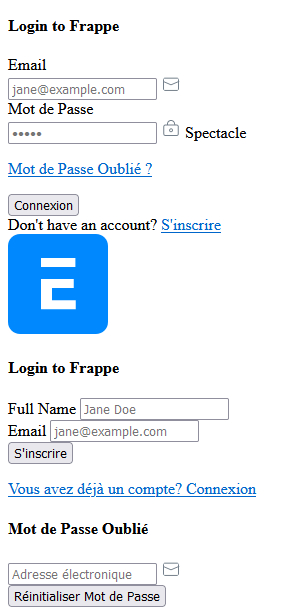
Here is a sample of the issue we are discussing here:
If you have other ways to solve this problem, please share in the comments section below.

Hello Mr. Karani,,
Really a great article.
Actually we are preparing a Developer Environment by following link https://github.com/frappe/frappe_docker/tree/main/development
But when we executes bench init –skip-redis-config-generation –frappe-branch version-13 frappe-bench
The complete server gets hang, after restarting server if we try to run bench build it gets hang too.
Server: aws lightsail Ubuntu
Using .devcontainer
Last command seen on terminal is as below:
Building frappe assets…
✔ Built js/checkout.min.js
✔ Built js/dialog.min.js
✔ Built js/user_profile_controller.min.js
✔ Built js/web_form.min.js
✔ Built js/list.min.js
✔ Built js/barcode_scanner.min.js
most of the time it gets stuck on web_form.min.js
then we just need to restart the complete server as it ssh gets hang all the time.
If you can help will be great, thanks.