Frappe / ERPNext Assets not Loading Properly
Kkarani1 min read
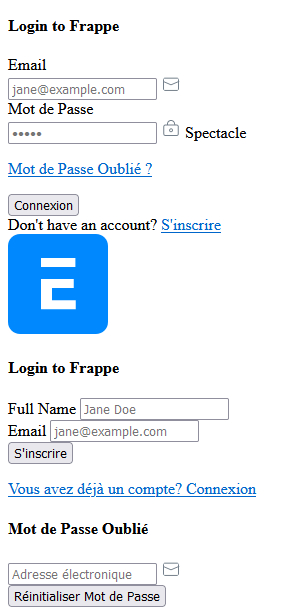
When you install ERPNext for the first time, it sometimes gets frustrating when the fields are not properly arranged as you would expect. I will share some of the commands I have found useful in this article.
bench build - This command has more abilities if you supply additional options, but we just run it as this to build our app assets.
bench migrate - This command also has greater capabilities, but we are interested in only this basic one. It will run patches, sync schema and rebuild files/translations.
The bench migrate command may sometimes require you to supply the site name, especially when your instance is on production mode. In this case, just run:
bench --site [xyz] migrate
The last command I would like to share today, which clears your browser cache just in case you have cached content that may be causing this problem:
bench clear-website-cache
Here is a sample of the issue we are discussing here:
https://youtu.be/HXU6oNWyy60
 If you have other ways to solve this problem, please share in the comments section below.
If you have other ways to solve this problem, please share in the comments section below.